Automatically Extract Email Attachments from Microsoft 365—24/7, On Your Own Infrastructure.
Email Extractor ETL automatically extracts invoices, bids, receipts, and documents from Microsoft 365—saving your team hours every day while feeding your existing business systems.
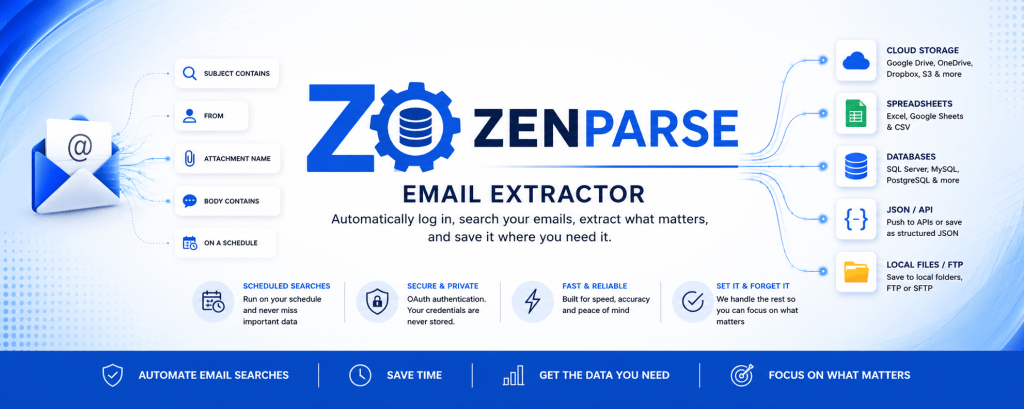
Automate Email Processing – Set intelligent queries to extract documents 24/7
On-Premise & Secure – Your data never leaves your infrastructure
Works While You Sleep – Runs as Windows service even when logged off
Unlimited Mailboxes – Query as many Microsoft 365 accounts as needed
ETL-Ready Output – Organize files for seamless integration with your CRM, ERP, or database
🔒 100% On-Premise | 🏢 No Cloud Dependencies | ⚡ 2-Hour Setup | 💰 $19/month
Is Your Team Wasting Hours on Email Busywork?
📥 Manual Download Hell
Your team spends 2-4 hours daily downloading attachments, renaming files, and organizing folders. That’s 10-20 hours per week on mindless busywork.
⏰ After-Hours Delays
Critical documents sit in inboxes overnight. Invoice processing, order fulfillment, and compliance workflows grind to a halt when employees go home.
❌ Human Error & Lost Files
Missed attachments, incorrect file names, and lost documents create compliance issues, late fees, and angry customers.
🔒 Cloud Vendor Lock-In
Cloud automation tools force your data through external servers, create compliance headaches, and charge per-task fees that spiral out of control.
ZenParse Email Extractor
Email Extractor is a Windows service that continuously monitors your Microsoft 365 mailboxes, intelligently extracts documents based on your rules, and organizes them for downstream processing—all without cloud dependencies or vendor lock-in.
How It Works (3-Step Process)
Step 1: Connect Your Mailboxes
Securely authenticate Microsoft 365 accounts using Microsoft’s device code flow. Add unlimited mailboxes in minutes.
Step 2: Create Smart Queries
Define extraction rules: filter by sender, subject, attachment type, date range, or body content. Use dynamic variables to automatically rename and organize files.
Step 3: Schedule & Automate
Set CRON-based schedules to run queries every minute, hour, day, or week. Your documents flow into your systems 24/7—even when you’re logged off.
Everything You Need for Email Document Automation
Intelligent Query Engine
Filter emails by subject, sender, attachment name, file type, body content, and date range. Combine multiple filters for surgical precision.
Benefit: Extract exactly what you need—no false positives, no manual sorting.
Multi-Mailbox Management
Connect unlimited Microsoft 365 mailboxes. Query shared inboxes, department accounts, or individual users from a single installation.
Benefit: Centralize email processing for your entire team or organization.
Dynamic File Organization
Use variables like `{date}`, `{emailAddress}`, `{uid}` to create custom file naming patterns and folder structures automatically.
Example: `C:\Invoices\{date}\{emailAddress}\*` → `C:\Invoices\2026-05-17\vendor@company.com\invoice_12345.pdf`
**Benefit:** Consistent, searchable organization that integrates seamlessly with your existing workflows.
True On-Premise Deployment
Runs as Windows service on your infrastructure. Your data never leaves your network. No cloud servers, no vendor access.
Benefit: Perfect for HIPAA, SOC2, GDPR compliance. Zero cloud vendor risk.
CRON-Based Scheduling
Create unlimited jobs with flexible schedules: every minute, hourly, daily, weekly, or custom CRON expressions. Set it and forget it.
Benefit: Documents flow into your systems 24/7 without manual intervention.
ETL Integration Ready
Outputs files to designated folders where your downstream systems (ERP, CRM, databases) monitor for new documents. Built for automation pipelines.
Benefit: Drop-in replacement for manual email processing—no changes to existing workflows.
Built for Teams That Receive Business Documents via Email
Accounting & Finance
The Problem: Finance teams receive 100+ vendor invoices daily. Manually downloading and organizing PDFs takes 3+ hours.
The Solution: Email Extractor automatically pulls invoices from specific vendors, renames them with vendor name + date, and saves to your accounting system’s import folder.
Time Saved: 15 hours/week
ROI: 60x ($1,500 value vs $19 cost)
Mortgage & Real Estate
The Problem: Investors send loan bids via email (no API). Processors waste 90+ minutes daily downloading bid sheets, causing delays.
The Solution: Auto-extract bid attachments from investor emails and route to loan pricing system for instant comparison.
Result: Process bids in <5 minutes vs 90 minutes
Revenue Impact: Capture 15-20 additional time-sensitive bids/month = $50K+ annually
Logistics & Supply Chain
The Problem: Carriers email 200+ proof-of-delivery (POD) documents daily. Manual downloads take 4 hours and create compliance risks.
The Solution: Automatically extract PODs from carrier emails, organize by customer/shipment ID, feed to customer portal automation.
Compliance: Avoid 5-10 chargebacks/month
Savings: $3K-5K monthly
Legal Services
The Problem: Court filing confirmations, client documents, and discovery files arrive via email. Manual organization is error-prone.
The Solution: Extract documents by case number, client name, or filing type. Auto-organize into matter management folders.
Benefit: Audit trail for compliance, searchable document organization
Insurance
The Problem: Claims documents, policy applications, and medical records flood adjuster inboxes. Processing delays cost money.
The Solution: Auto-route claims documents to case folders, extract policy apps to underwriting queue, organize medical records by claim number.
Benefit: Faster claims processing, reduced errors, better customer experience
Healthcare Administration
The Problem: Patient referrals, insurance authorizations, and lab results arrive via email. Manual intake slows patient care.
The Solution: Extract referral PDFs to patient folders, route insurance auths to billing system, organize lab results by patient ID.
Compliance: HIPAA-compliant on-premise processing
Benefit: Faster patient care, reduced admin burden
Why Email Extractor Beats the Alternatives
| Email Extractor | Power Automate | Zapier | Custom Build | |
| Monthly Cost | $19 flat | $200-500+ | $30-600 | $0 (+ maintenance) |
| Deployment | On-premise | Cloud-only | Cloud-only | On-premise |
| Setup Time | 30 mins | 7-10 hours | 5-7 hours | 50-120 hours |
| Task Limits | Unlimited | Unlimited | 750-50K/month | Unlimited |
| Microsoft 365 | Native Graph API | Native | Limited IMAP | Custom build |
| Data Security | 100% on-premise | Microsoft cloud | Zapier cloud | On-premise |
| Learning Curve | 15 minutes | 2-5 hours | 2-4 hours | Weeks |
| Maintenance | Auto-updates | Managed | Managed | Ongoing dev time |
| Best For | Email document automation | General workflows | Cross-app integrations | Edge cases only |
60-90% Cost Savings vs Power Automate for email-focused use cases
10x Simpler than building custom solutions—deploy in hours, not weeks
No Task Limits unlike Zapier’s tiered pricing
On-Premise Security for regulated industries (HIPAA, SOC2, GDPR)
Zero Cloud Dependencies – you own the workflow and process
Common Questions About Email Extractor
1. What email providers does Email Extractor support?
Email Extractor supports Microsoft 365 / Office 365 accounts (Business, Enterprise, Education). Personal Microsoft accounts (Outlook.com, Hotmail) are not currently supported.
2. Do I need to install anything in the cloud?
No. Email Extractor runs entirely on your Windows machine as a service. Your data never leaves your infrastructure.
3. Does this work when I’m logged off my computer?
Yes! Email Extractor runs as a Windows service and continues processing emails 24/7, even when you’re logged off or the computer is idle.
4. How secure is my data?
Email Extractor uses Microsoft’s secure authentication (MSAL) and stores tokens locally. We never access, transmit, or store your email content. Everything stays on your infrastructure.
5. How long does setup take?
Most users are up and running in 1 hour. Azure app registration takes 15-20 minutes, adding mailboxes takes 5 minutes each, and creating queries takes 5-10 minutes.
6. What if I need help setting it up?
We provide detailed documentation, video tutorials, and email support. Enterprise customers can upgrade to priority support with phone/chat.
7. Can I process emails from multiple departments or companies?
Yes. Connect unlimited Microsoft 365 mailboxes from different departments, business units, or even separate companies.
8. What file types can Email Extractor handle?
All attachment types: PDFs, Excel files, Word docs, images, CSVs, and more. You can filter by file extension (`.pdf`, `.xlsx`, etc.) or process all types.
9. How do I integrate with my existing ERP/CRM?
Email Extractor saves files to designated folders on your network. Configure your ERP/CRM to monitor these folders for new files (most modern systems support file-based imports).
Built for Security, Compliance, and Reliability
On-Premise Deployment
Your data never leaves your infrastructure. No cloud servers, no external access.
Microsoft Secure Auth
Uses Microsoft MSAL for secure authentication. We never see your passwords or credentials.
99.9% Uptime
Runs as reliable Windows service with automatic error recovery.
Security Details
Authentication: Microsoft MSAL device code flow (Microsoft-recommended for desktop apps)
Token Storage: Encrypted locally on your infrastructure
Data Processing: 100% on-premise—no cloud transmission
Updates: Automatic security patches and feature updates
Audit Trail: Complete logging of all extractions and job executions